YOU DO NOT NEED TO KNOW EVERYTHING.
Your first year is about learning how to think, test and communicate - not collecting software and architectural vocabulary.
LEARN ONE WORKFLOW
A strong sequence of decisions will save you more time than knowing ten programs badly.
LOOK AT REAL BUILDINGS
Plans, sections, details, materials and everyday use matter more than a beautiful hero render.
PRINT EARLY
A drawing that feels perfect on a laptop can completely fail at A1.
KEEP YOUR PROCESS
Save sketches, failed versions, models and diagrams. They show you how your thinking changes.
ASK SPECIFIC QUESTIONS
'How can I make it better?' is too broad. 'Does this entrance sequence work?' can actually move a project forward.
I WOULD LEARN ONLY FOUR TOOLS FIRST.
These are not the only good programs. They are the tools I personally use, so these are the ones I can genuinely recommend.
REVIT
Design + coordinated plans and sections.
VISOID
Visual direction + architectural visualisation.
PHOTOSHOP
Post-production + collage + graphic control.
INDESIGN
Boards + portfolios + final storytelling.
Build a workflow you can repeat from brief -> project -> presentation.
THE PROJECT SHOULD LEAD THE SOFTWARE.
- READ THE BRIEF
- DEFINE THE QUESTION
- COLLECT REFERENCES
- SKETCH + TEST
- REVIT
- CHOOSE VIEWS
- VISOID + PHOTOSHOP
- INDESIGN
THE QUESTION AT EACH STEP
BRIEF: What is actually being asked?
REFERENCES: What do I need to learn?
MODEL: Does plan + section work?
VIEWS: What needs to be understood?
LAYOUT: What should be seen first?
BUILD A BETTER ARCHITECTURE INTERNET.
Pinterest is useful for discovery. It should not be your entire research method.
DIVISARE Open
Search by typology, architect and architectural element. Useful when you need actual built references.
DRAWING MATTER Open
Architectural drawings, archives and drawing as a way of thinking.
KOOZARCH Open
Conceptual work, representation, interviews and critical design thinking.
THE ARCHITECTURAL REVIEW Open
Criticism, essays and buildings beyond fast image consumption.
MY RULE
Save less. Open more plans, sections and details.
SIX BOOKS I WOULD KEEP NEAR MY DESK.
You do not need to finish them before semester starts. Read slowly and return when a project gives you a reason.
EXPERIENCING ARCHITECTURE
Steen Eiler Rasmussen
proportion / rhythm / perception
LESSONS FOR STUDENTS IN ARCHITECTURE
Herman Hertzberger
space / use / project thinking
THE EYES OF THE SKIN
Juhani Pallasmaa
architecture beyond the image
ATMOSPHERES
Peter Zumthor
material / sound / temperature / mood
A PATTERN LANGUAGE
Christopher Alexander et al.
spatial questions / everyday life
CARLO SCARPA: ARCHITECTURE IN DETAILS
various studies
junctions / craft / physical precision
Read it because your next project needs a better question.
LEARN REVIT AS A DESIGN TOOL.
I would learn plan and section together from the beginning. The model is useful only if it helps you make architectural decisions.
levels + grids
walls + openings
stairs
rooms + furniture
plans + sections
simple sheets
Model what you need to make the next decision. First year is not a BIM competition.
VISUALISE AFTER YOU HAVE A POINT OF VIEW.
A beautiful image should clarify architecture, not convince you to stop questioning it.
- Decide what the view needs to explain.
- Export a clear architectural base from Revit.
- Use references intentionally: material, light, mood.
- Explore visual directions in Visoid.
- Choose and refine instead of generating endlessly.
- Finish only what matters in Photoshop.
PHOTOSHOP IS NOT JUST FOR MAKING IT PRETTY.
01 HIERARCHY
Control what the eye sees first.
02 ATMOSPHERE
Light, people and texture should support the spatial idea.
03 COLLAGE
A fast collage can test an idea before a polished render is worth making.
04 DIAGRAMS
Simple graphics are often stronger than over-designed ones.
05 FINAL CONTROL
Colour, contrast and consistency before layout.
YOUR PRESENTATION IS PART OF THE PROJECT.
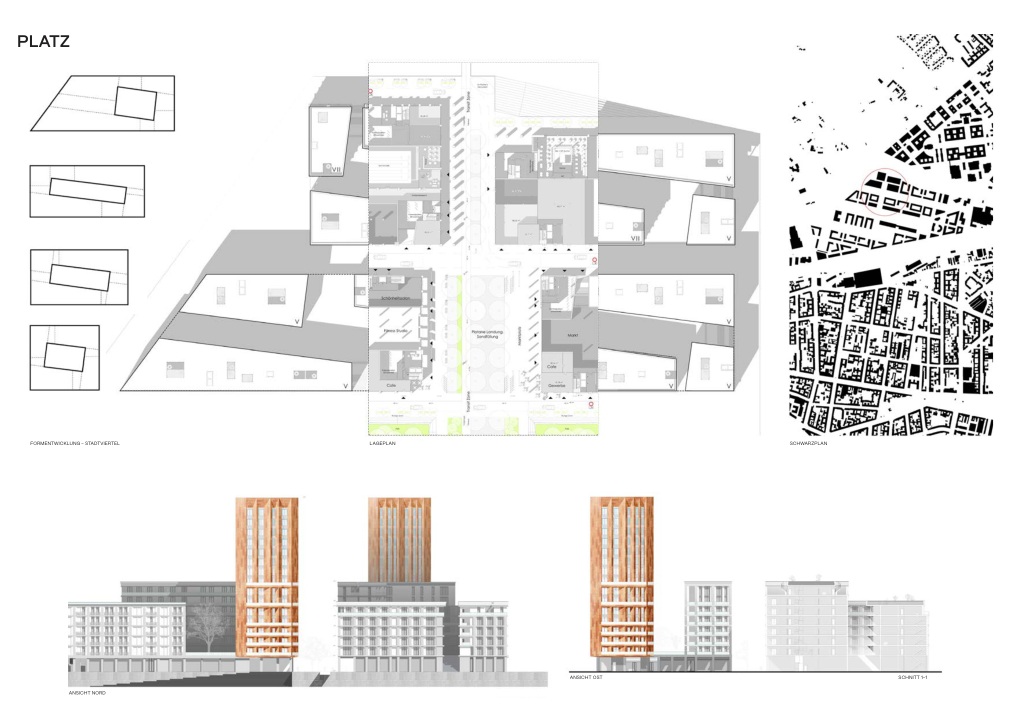
InDesign is where I would learn to edit: hierarchy, sequence, white space and what deserves to be large.
01 ONE HERO
Decide what should be understood first.
02 ONE GRID
Use alignment instead of decorating empty space.
03 FEWER FONT SIZES
Typography should organise, not perform.
04 WHITE SPACE
Do not fill every centimetre.
05 PRINT TEST
Always.
ONE PROJECT. ONE IDEA. MANY SCALES.
I want to show this as a project workflow, not as a collection of final images.
01 / EXPERIENCE FIRST
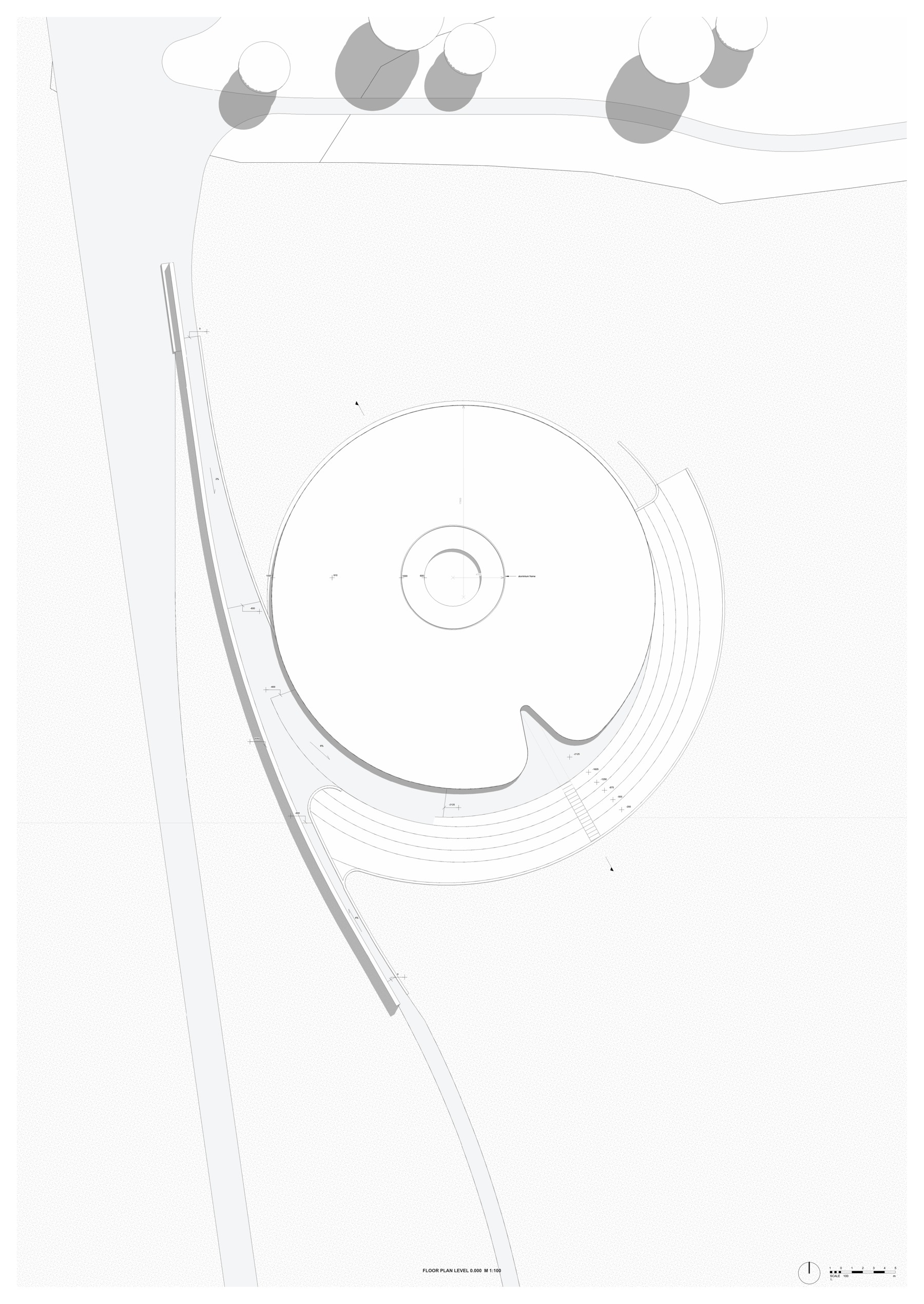
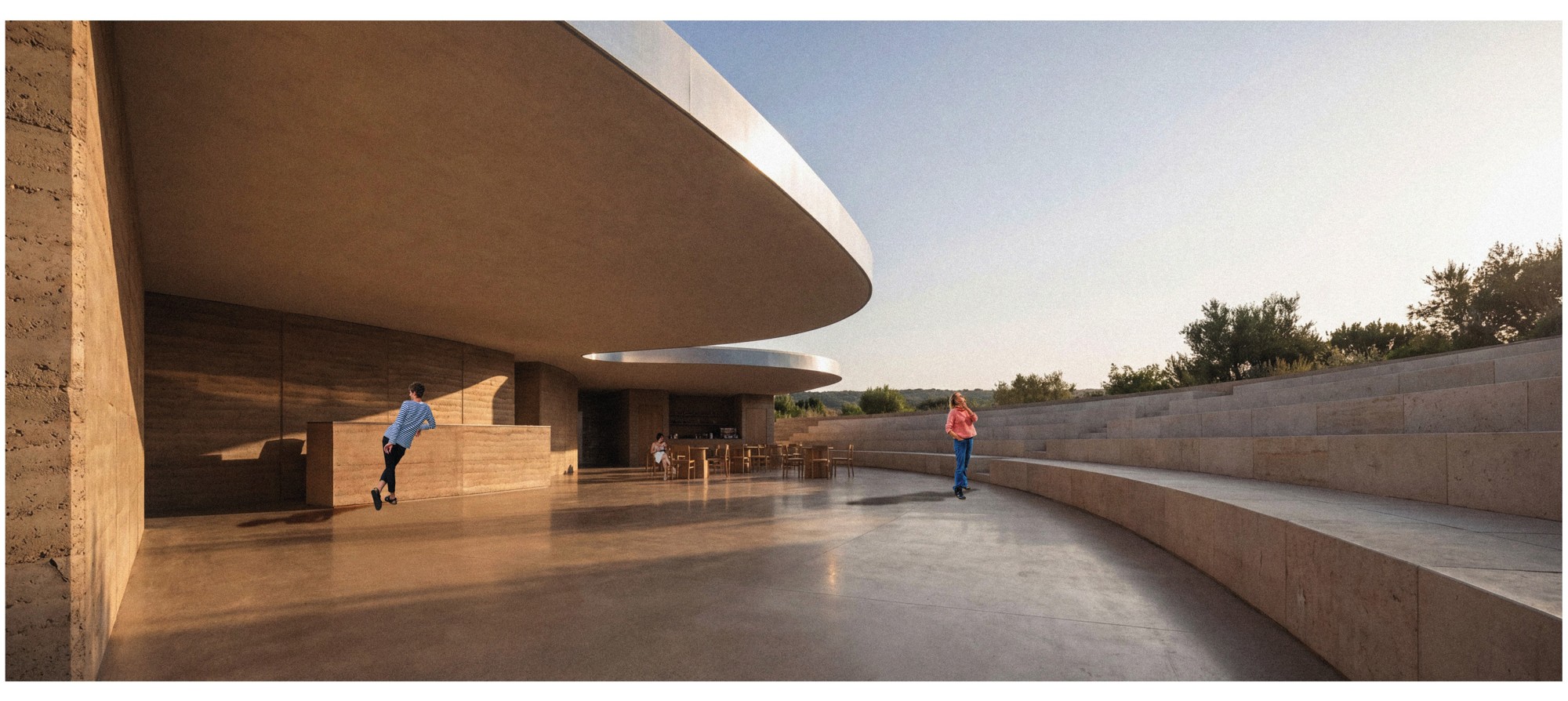
The project begins with the relationship between landscape, retreat and a slower sequence of arrival. Before details, the project needs a clear spatial intention.
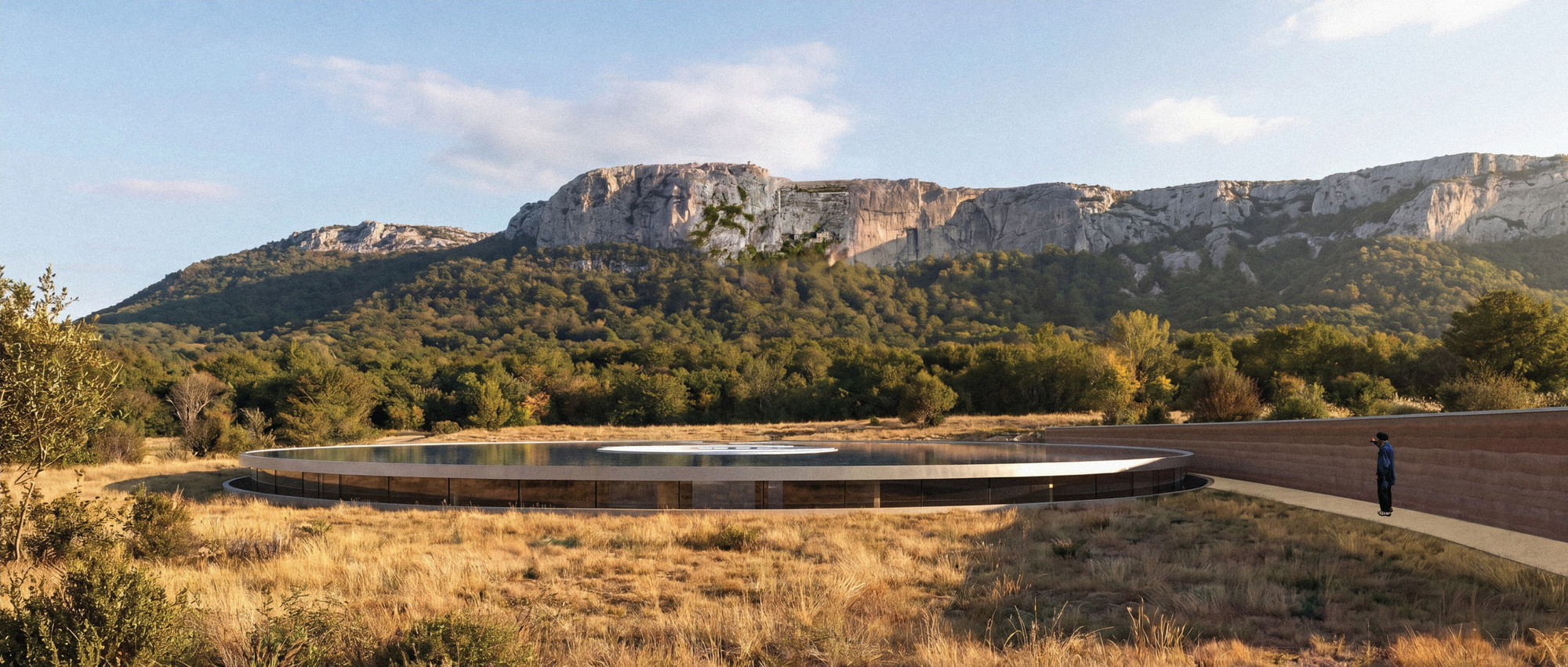
WHAT TO NOTICE
- the building sits low in the landscape
- the circular form organises movement
- architecture and landscape are read together before the room
PLAN + SECTION HAVE DIFFERENT JOBS.
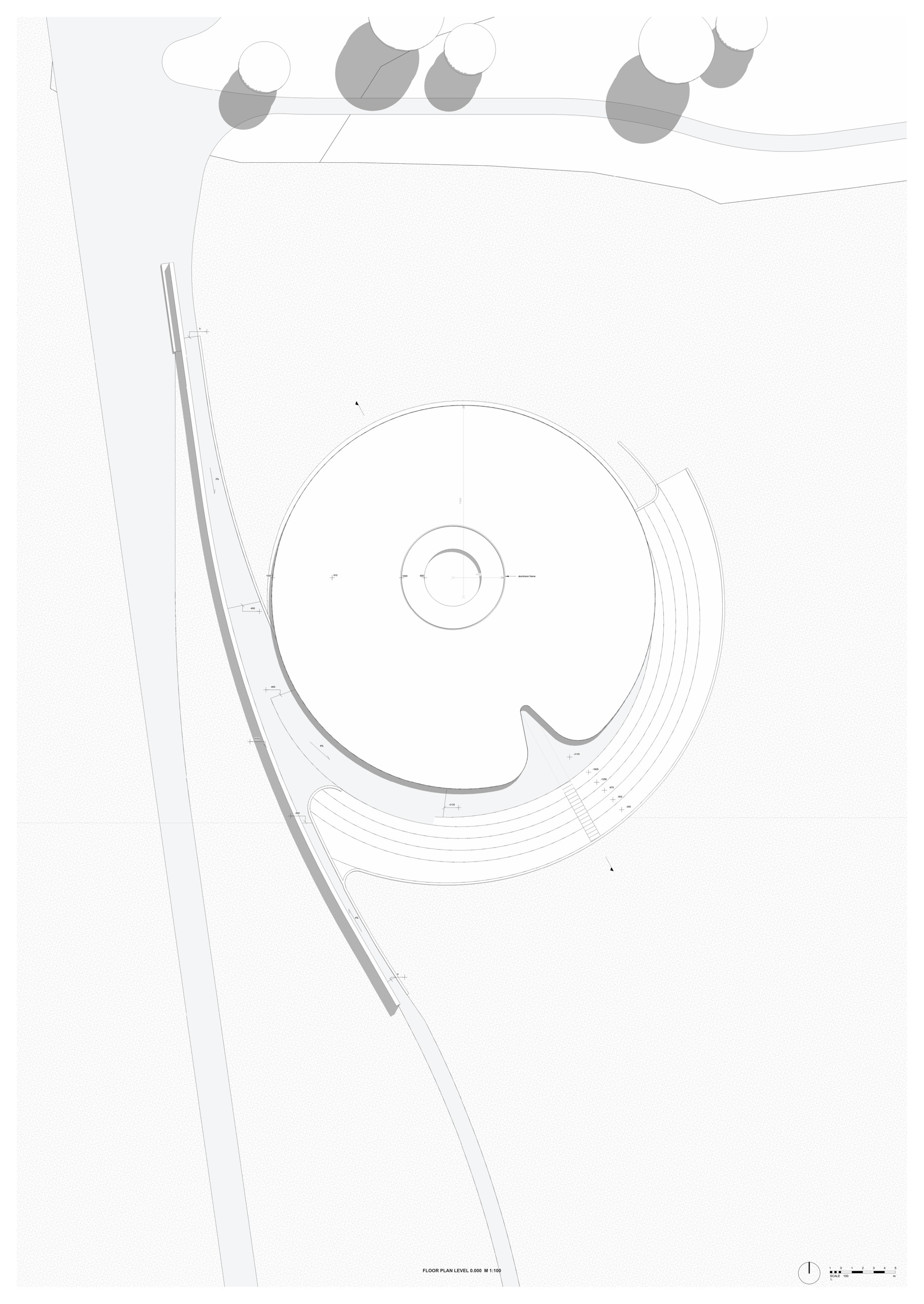
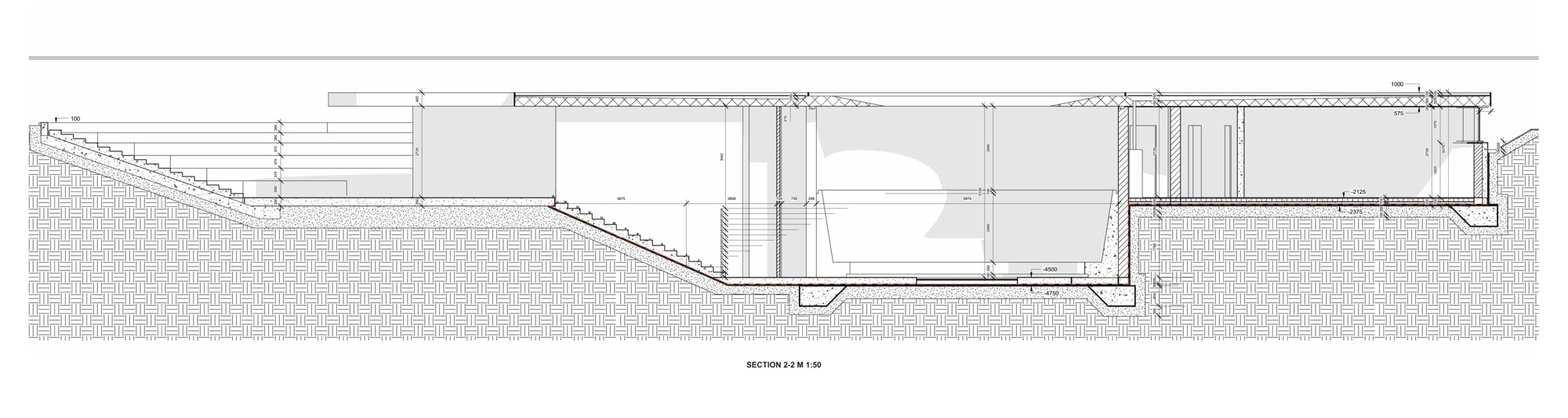
PLAN: Organisation, sequence, programme, circulation and the geometry of the central space.
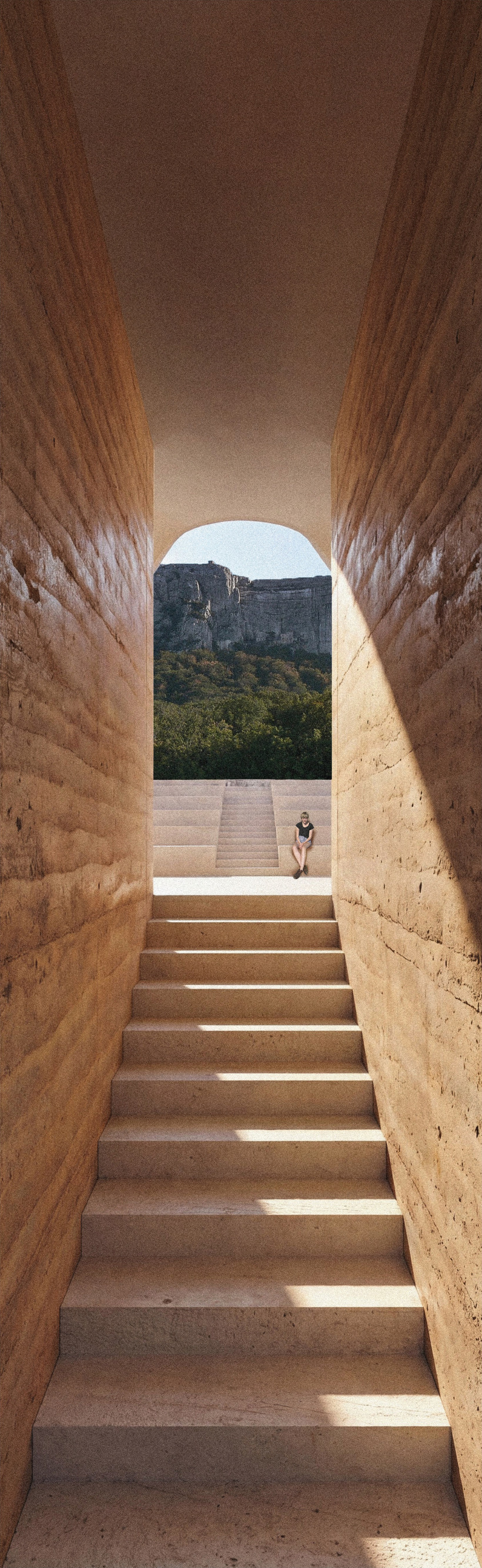
SECTION: Level changes, ground, light, structure and the relationship between interior and landscape.
Take one project you admire. Cover the images. Try to explain the idea using only one plan and one section.
THE PROJECT GETS MORE PRECISE.
The closer the scale, the more specific the decisions become.
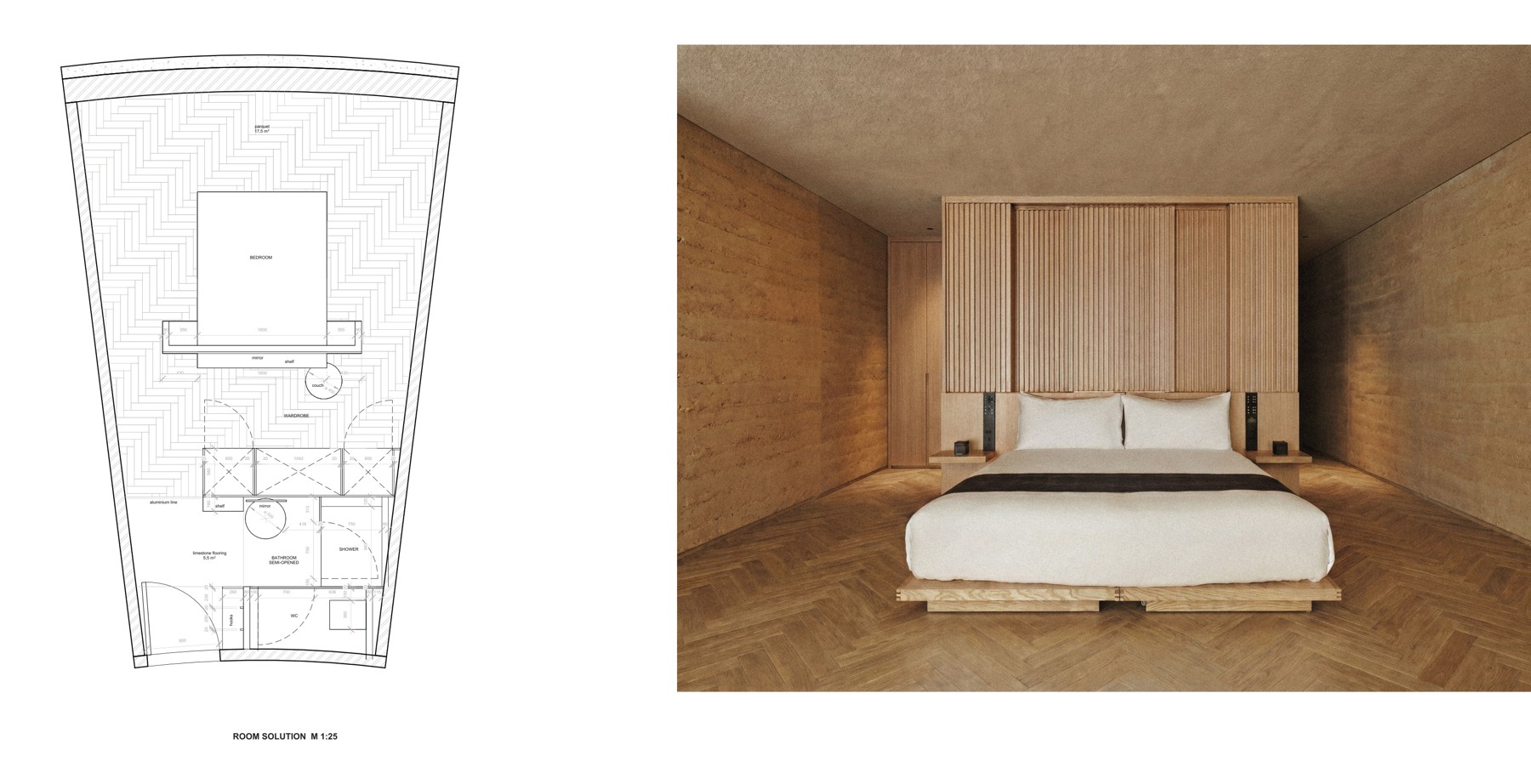
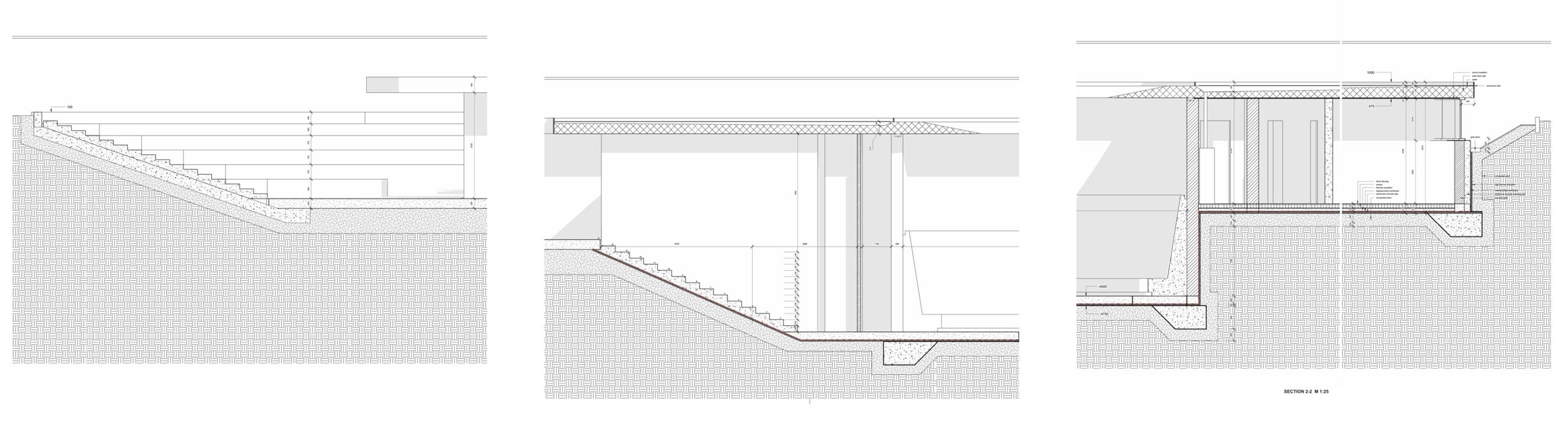
WHAT CHANGES?
At room and detail scale, proportion becomes material, junction, build-up, drainage and the exact way someone touches the architecture.
COURSES I WOULD ACTUALLY LOOK AT.
My rule: learn one thing, use it immediately in your current project, then learn the next thing.
OT 0 DO 10 / @ot0do10
BEST FOR: structured architecture learning. OPEN RESOURCE
SOFT CULTURE
BEST FOR: software through architecture. OPEN RESOURCE
GROMARCH
BEST FOR: visuals + graphics + workflow. OPEN RESOURCE
Finish one focused course and use it on a real project.
DO NOT START WITH PINTEREST.
Start by understanding the problem. Inspiration becomes useful only after you know what you are looking for.
01 WHAT IS THE SITE DOING?
Light, access, slope, neighbours, noise, views, existing structure.
02 WHO IS THIS FOR?
Imagine real routines, not an abstract 'user'.
03 WHAT IS THE ONE IDEA?
If you cannot explain it in one sentence, it is probably not clear enough yet.
04 WHAT MUST THE PLAN SOLVE?
Circulation, privacy, daylight, dimensions, thresholds, storage.
05 WHAT MUST THE SECTION SOLVE?
Height, light, levels, structure, relation to landscape.
THEN LOOK FOR REFERENCES THAT ANSWER THOSE QUESTIONS.
DO NOT SAVE A BUILDING. DISSECT IT.
- What is the plan doing that mine is not?
- Where is the main circulation sequence?
- How does the section bring in light?
- What is structural and what only looks structural?
- Where do materials change - and why there?
- How does the building meet the ground?
- What happens at the door, window, corner and threshold?
- What would still be good if the render was ugly?
SIX PROJECTS. SIX DIFFERENT LESSONS.
ALVARO SIZA: LECA SWIMMING POOLS
STUDY: building + landscape
TADAO ANDO: CHURCH OF THE LIGHT
STUDY: light as architecture
CARLO SCARPA: CASTELVECCHIO
STUDY: junctions + stairs
MIES VAN DER ROHE: NEUE NATIONALGALERIE
STUDY: structure + proportion
PETER ZUMTHOR: THERME VALS
STUDY: material + sequence
LACATON & VASSAL: GRAND PARC BORDEAUX
STUDY: generosity + reuse
ARRIVE WITH A QUESTION, NOT A PANIC.
FOR A CRIT
01 START WITH ONE SENTENCE
What is the project trying to do?
02 SHOW THE RIGHT DRAWING FIRST
The clearest drawing, not necessarily the prettiest.
03 ASK ONE SPECIFIC QUESTION
Make it possible to give you useful feedback.
04 WRITE FEEDBACK DOWN
You will not remember everything afterwards.
05 DO NOT CHANGE EVERYTHING
Separate useful criticism from personal preference.
BUILD YOUR FIRST PROJECT SYSTEM.
- THE BRIEF: What is actually being asked?
- THE QUESTION: What is the one spatial problem I am solving?
- THE SITE: What must I respond to?
- THE USER: What everyday routine matters?
- REFERENCES: What do I need to learn from them?
- NEXT DECISION: What exactly do I need to resolve next?
FIRST YEAR STARTER CHECKLIST.
- Install Revit and learn the basic interface.
- Create one tiny practice model - not a full project.
- Learn Photoshop selections, masks, layers and adjustment tools.
- Learn pages, grids and paragraph styles in InDesign.
- Bookmark 3-4 architecture reference sources you trust.
- Study one building properly: plan + section + detail + photos.
- Create a clean folder and file-naming system.
- Set up automatic backups.
- Remember: you are allowed to be a beginner.